Enhancing Remote Collaboration and Presence with Google Meet Integration
In this article

Enhancing Remote Collaboration and Presence with Google Meet Integration
Effective communication in 2026 relies on understanding team availability in real-time. While Google Meet serves as a primary tool for structured video conferencing, remote teams often struggle with the "visibility gap"—not knowing if a colleague is busy, focused, or ready for a quick chat. This lack of visual context often leads to unnecessary interruptions or delayed decisions. By integrating presence indicators, teams can determine the best moment to initiate a Google Meet session, ensuring that meetings occur when participants are actually mentally available and prepared to engage.
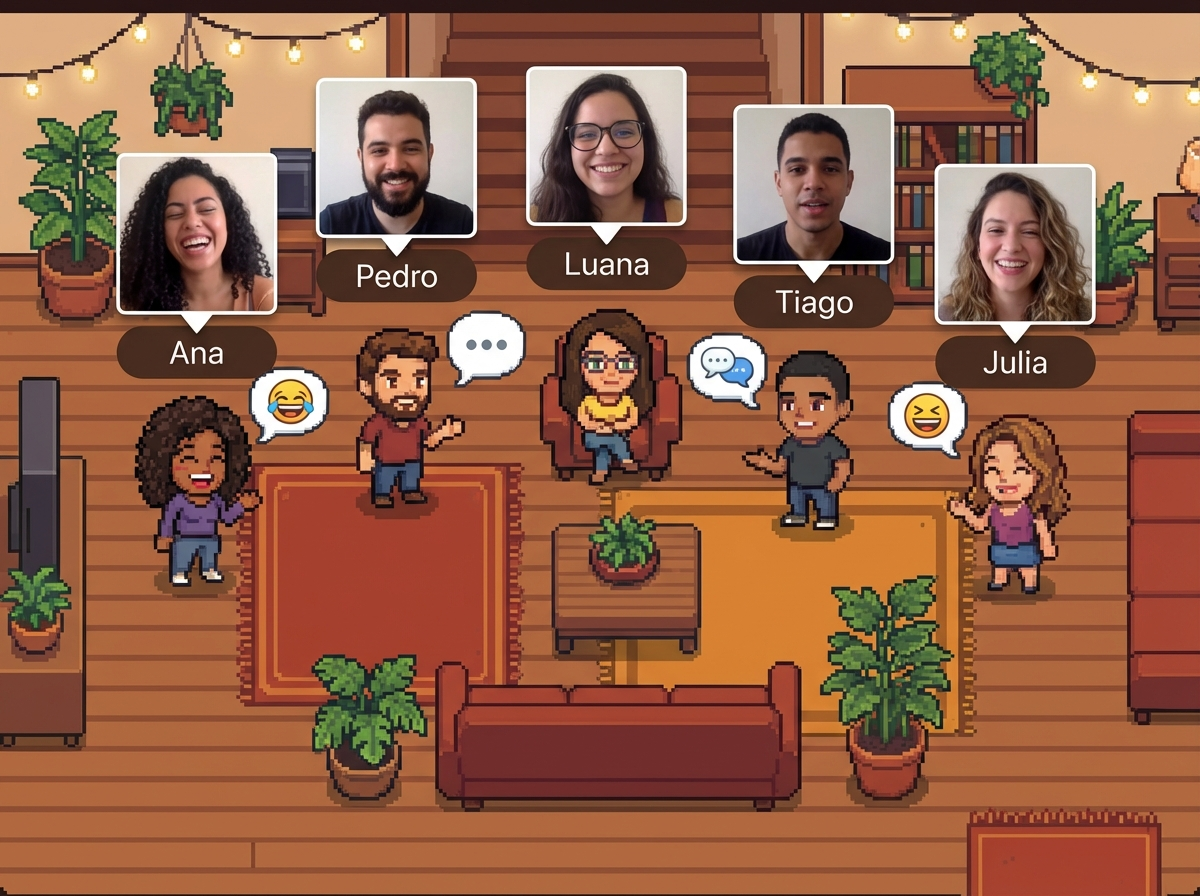
The modern digital workspace requires more than just a link to a Google Meet room; it needs a layer of transparency. Platforms like Hurbly.ai address this by providing a virtual office environment where you can see who is currently active. When you see a coworker is free, you can transition from a simple status check to a productive Google Meet call instantly. This approach reduces the friction of back-and-forth messaging to ask "Are you free?", making the use of Google Meet more intentional and less disruptive to deep work cycles.
How Real-Time Presence Optimizes Video Conferencing
Real-time technology tracks user activity to display specific statuses such as "Available," "Deep Work," or "In a Meeting." This data is crucial for managing a distributed workforce. If a team member is already in a Google Meet session, their status update prevents others from attempting to start a new conversation. This hierarchy of communication ensures that Google Meet remains a tool for high-value interaction rather than a source of constant distraction.
Understanding the context of a colleague's day changes how teams interact. For example:
- Focused State: Avoid sending invites for a Google Meet to respect deep work.
- Available State: Perfect for spontaneous brainstorming or a quick sync via Google Meet.
- Meeting State: Indicates the person is already occupied, perhaps in another Google Meet or a private call.
By using these indicators, organizations can foster a culture of respect and efficiency. Instead of guessing, employees use the virtual office map to decide if they should send a text message or launch a Google Meet for a more complex discussion. This clarity is what differentiates a high-performing remote team from one struggling with communication silos.
Benefits of Spontaneous Interaction in Digital Offices
Spontaneous interaction is often lost when moving from a physical office to a remote setup. In a physical building, you can see if someone has their headphones on or if they are chatting by the water cooler. Digital office solutions recreate this by showing presence, allowing for "walk-up" moments that lead to a Google Meet naturally. This replicates the serendipity of office life, where a quick question can be resolved in a two-minute Google Meet instead of a long email thread.
| Feature | Impact on Collaboration | Role of Google Meet |
|---|---|---|
| Live Presence | High visibility of team availability | Informs when to start a Google Meet |
| Status Indicators | Reduces unnecessary interruptions | Protects time between Google Meet sessions |
| Instant Audio/Video | Facilitates rapid problem solving | Provides the platform for the Google Meet |
| Virtual Map | Enhances team cohesion and "vibe" | Visualizes who is gathered in a Google Meet |
When teams use Hurbly.ai, they gain a spatial understanding of their organization. Seeing a group of icons clustered together might indicate an ongoing Google Meet where a specific project is being discussed. This visual cues allow others to join the Google Meet if relevant, or simply stay informed that a collaboration is taking place. It transforms the experience from isolated windows into a shared, living workspace.
Streamlining Workflows for Remote and Distributed Teams
For freelancers and distributed organizations in 2026, time management is the greatest challenge. Transitioning between different tasks requires a seamless flow. If a project manager needs a quick update, they check the virtual office first. If the developer is available, they trigger a Google Meet immediately. This workflow eliminates the 15-minute "scheduling lag" that typically precedes a Google Meet, saving hours of cumulative team time every week.
- Check the virtual office interface to see which team members are active.
- Observe if the required person is currently in a Google Meet or marked as "Focused."
- If they are available, initiate a conversation or invite them to a Google Meet.
- Conclude the Google Meet and update your status back to "Available" or "Deep Work."
By following this structured approach, teams ensure that Google Meet is used effectively. The goal is to maximize the quality of every Google Meet while minimizing the quantity of unnecessary calls. This balance is essential for maintaining high morale and preventing video call fatigue, a common issue in remote work environments. Leveraging presence technology alongside Google Meet creates a more human, responsive, and productive digital workplace.

