Understanding Virtual Offices for Remote Team Collaboration
In this article

Understanding Virtual Offices for Remote Team Collaboration
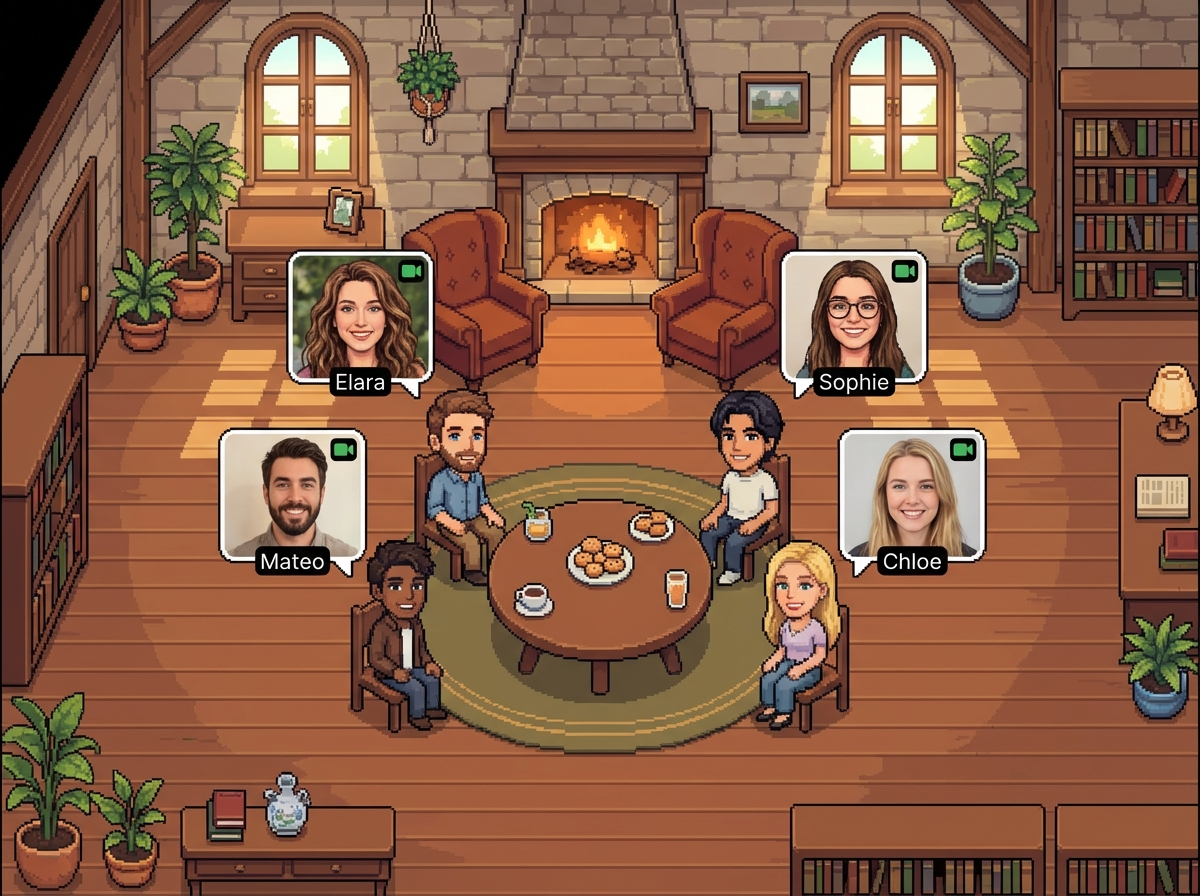
Virtual office platforms are digital environments designed to simulate the physical presence of a traditional workspace. By using real-time technology, these tools allow distributed teams to see who is currently available, who is deeply focused, or who is participating in a meeting. This visibility helps employees work smarter not harder by eliminating the guesswork involved in reaching out to colleagues. Instead of sending messages into a void or waiting for email replies, team members can identify the perfect moment for a quick sync, mirroring the spontaneous interactions that happen in a physical office.
The primary goal of a virtual office is to reduce the friction often associated with remote work. When you can see your team’s status at a glance, you can work smarter not harder by choosing the most efficient communication channel for the situation. These platforms provide a visual map of the organization, showing presence indicators that update instantly. This transparency builds trust and ensures that everyone stays aligned without the need for constant, disruptive status update meetings.
How Real-Time Presence Indicators Enhance Productivity
Real-time presence technology functions by monitoring user activity and manual status settings to provide an accurate picture of team availability. When individuals use these tools, they can work smarter not harder because they no longer need to schedule formal thirty-minute video calls for questions that only take two minutes to answer. The system displays specific states, such as "available," "in a meeting," or "focus mode," allowing others to respect deep-work boundaries while identifying windows for collaboration.
Implementing a system like Hurbly.ai allows teams to maintain a high level of situational awareness. By integrating these indicators into daily workflows, employees learn to work smarter not harder by timing their interactions based on their coworkers' actual availability. This reduces the cognitive load of multitasking and prevents unnecessary interruptions, which are common in environments that rely solely on persistent chat notifications or back-to-back calendar invites.
Benefits of Spontaneous Interaction in Digital Workspaces
Spontaneous interaction is a cornerstone of innovation, yet it is often lost in remote settings. Virtual offices recover this lost value by enabling instant, informal conversations. When team members feel they can "drop by" a colleague's digital desk, they work smarter not harder by resolving issues in real-time. This fluidity prevents small bottlenecks from turning into project delays. It also fosters a sense of belonging, as remote workers feel less isolated when they can see their peers active alongside them.
To truly work smarter not harder, organizations must move away from rigid communication structures. A virtual office provides a middle ground between the silence of a lonely home office and the noise of a crowded chat room. By facilitating quick "watercooler" moments and rapid problem-solving sessions, Hurbly.ai helps teams maintain social cohesion and operational speed. This approach ensures that information flows naturally across the organization, regardless of geographical barriers or time zone differences.
Key Features for Efficient Remote Coordination
Modern virtual offices include several features designed to help teams work smarter not harder. These tools are not just about seeing a green dot next to a name; they are about creating a functional ecosystem for professional engagement. Effective platforms prioritize clarity, ease of use, and integration with existing workflows.
- Visual Office Layouts: A graphical representation of the team that makes the digital space feel tangible.
- Focus Mode Protections: Indicators that signal when a user should not be disturbed, helping the whole team work smarter not harder by protecting deep work.
- Instant Audio/Video Zones: Dedicated spaces where users can jump into a conversation without generating a meeting link.
- Status Customization: The ability to provide context, such as "out for lunch" or "picking up kids," which helps colleagues work smarter not harder by managing expectations.
Comparing Communication Methods in 2026
In 2026, the distinction between synchronous and asynchronous work has become more defined. Teams that work smarter not harder utilize a mix of both, but they rely on virtual offices to bridge the gap. Unlike traditional messaging apps that can feel overwhelming, a virtual office provides a calm, persistent overview of the team’s current state.
| Feature | Traditional Messaging | Virtual Office (Hurbly.ai) |
|---|---|---|
| Visibility | Limited to active/inactive status | Detailed presence and focus states |
| Interaction | Primarily text-based and delayed | Instant, spontaneous voice/video |
| Scheduling | High reliance on calendars | Low reliance; favors "right now" syncs |
| Team Feel | Disconnected and transactional | Connected and organic |
By choosing the right environment, managers ensure their teams work smarter not harder by reducing "meeting fatigue." When the office is always "visible," the need for performative presence disappears, and the focus shifts back to actual output and meaningful collaboration.
Implementing a Virtual Office Strategy
To successfully integrate a virtual office, leadership must encourage a culture where people feel comfortable being "seen" digitally. When employees understand that visibility is a tool to help them work smarter not harder, rather than a surveillance mechanism, adoption rates increase. The goal is to create a digital home where freelancers, distributed teams, and hybrid workers can coexist effectively.
- Define Status Etiquette: Establish what different status indicators mean for your specific team.
- Encourage Brief Syncs: Shift the culture toward five-minute "huddles" to work smarter not harder instead of long meetings.
- Respect Focus Time: Use the platform to signal when you are unavailable to ensure uninterrupted productivity.
- Integrate Tools: Ensure your virtual office, like Hurbly.ai, complements your existing project management software.
By following these steps, organizations can ensure their workforce continues to work smarter not harder well into the future. The transition to a virtual office is a strategic move toward a more transparent, agile, and human-centric way of working in the digital age. This evolution allows every team member to work smarter not harder by leveraging real-time data to optimize their daily interactions.

